
How Oura Uses 3D Product Animation to Sell a Titanium Ring
Open Oura’s Ring 4 product page and scroll to the Smart Sensing section. The camera pushes into the inside of the ring, close enough that the recessed sensors fill the frame. Then it keeps going, past the point where the geometry stops making sense, and the image dissolves into a drifting field of warm particles. A beat later you are pulled back out and the ring is sitting quietly on linen.

The whole sequence is six seconds long.
We get asked about that specific six seconds more than almost any other reference. Clients send it over and say some version of “we want the part where the particles come out of the ring.” So, this is a teardown of the entire page: what is actually animated, what only looks animated, how the particle effect is built, and which decisions are worth copying.
Oura’s redesign, built by Instrument on a headless Next.js and Shopify stack from Commerce-UI, reported a 42% increase in sales per day, a 130% improvement in mobile performance, and a 3% lift in funnel progression one month after launch. It won Gold in Consumer Tech at The Drum Awards for Marketing. Those numbers cover the full redesign rather than any single animation, but they tell you how seriously this brand treats the product page as a sales surface.
The page inventory: what is actually moving
Start here, because the headline finding is how little of this page is animated.
| Section | Treatment | Job it does |
|---|---|---|
| Hero | Still image | Load instantly, be indexable |
| Smart Sensing | 6-second video | Show the sensors, visualise the invisible |
| Incredible comfort | Video with poster fallback | Show the seamless titanium interior |
| Uninterrupted health tracking | Looping video | Make “5-8 days” feel effortless |
| A finish for every lifestyle | 6 pre-rendered stills | Let the buyer choose a finish |
| Membership features | App UI screenshots | Explain the software |
| Tech specs | Product still | Reference |
Three moments of motion on a page selling a product that starts at several hundred dollars. Everything else is a still image or an interface screenshot.
That restraint is the actual lesson, and it is the opposite of what most brands take away from looking at pages like this. Oura spends motion only where a static image genuinely cannot do the job, and it uses the cheapest technique that achieves the result each time.
Scroll-driven animation: the technique, and what Oura actually uses
Scroll-driven 3D product animation ties a pre-rendered animation to the visitor’s scroll position rather than to a clock. Scroll down and the product moves forward, scroll up and it reverses, stop and it holds.
There are two ways to implement it, and brands get described as doing the harder one when they are doing the simpler one.
Frame-by-frame on a canvas. A folder of individually rendered stills is drawn onto an HTML <canvas>, one frame at a time. This is the technique behind most Apple product pages. Exact frame control, never stutters, but it means shipping 150 to 300 separate image files with preload choreography.
A short video, triggered or scrubbed. One encoded video file sits in the section and either plays when it enters the viewport or has its playhead bound to scroll progress. One file, far less engineering.
Oura uses the second approach throughout. Each animated section is a short video with a static poster image behind it, served from the same imgix pipeline as everything else on the page. The poster files are named to match their sections, accuracy-bg-fallback.jpg and comfort-bg-fallback.jpg, and they render before the video loads or when motion is suppressed.
This matters commercially. Brands assume that matching this level of polish requires an expensive canvas rig and a specialist front-end build. For most product pages it does not. It requires a well-rendered six-second film and a <video> tag.
Shot by shot: the Smart Sensing sequence
Four moves in six seconds, and the whole thing is one continuous camera push, which is why it feels like a single gesture rather than a sequence of cuts.
0:00, the establishing angle. The ring sits on warm wood, tilted so you look down into the band at roughly forty degrees. This is the shot that does the selling: it shows the seamless titanium interior with four recessed sensor windows set flush into the surface. You can pick out the green LED, the infrared emitters, and the temperature sensor. No photograph gets this angle cleanly, because the interesting surface faces inward and a real lens either loses it to shadow or blows out the polished titanium beside it.
0:00 to 0:01, the macro push. The camera moves in until the sensor array spans the frame. Depth of field collapses hard. Critically, the sensors themselves are only partly sharp, which is what sells the scale: at this magnification a real macro lens would have a focal plane a fraction of a millimetre deep, and the render respects that.
0:01, the dissolve into particles. The push continues past the geometry and the image becomes a field of fine bright specks over a soft, warm, out-of-focus surface. Read literally, this is skin at a scale the eye cannot resolve, and light scattering through tissue. Read as marketing, it is the invisible thing the product measures, made visible. The palette stays in the same warm amber range as the wood and the titanium reflections, so it does not read as a cut to somewhere else. It reads as continuing to travel in the same direction.
0:03 to 0:06, the pull back. The camera retreats and the ring resolves again, now top-down on neutral linen, centred and calm. Different environment, different lighting, arrived at through motion rather than a cut. This is the resting composition the section holds on.
How the particle effect is actually made
This is the part clients ask about, so here is the production answer rather than the marketing one.
It is not one effect. It is four things stacked, and it falls apart if any one is missing.
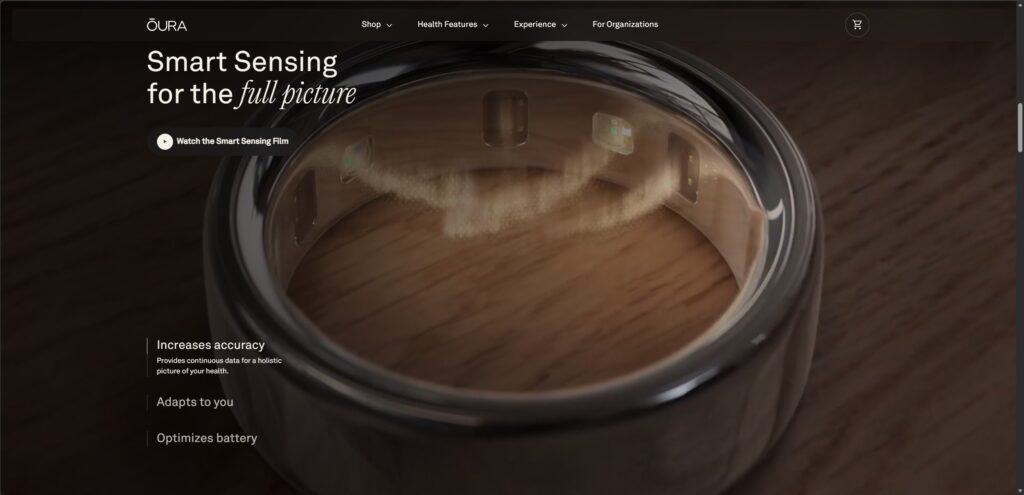
The particle system. A high-count point or instance cloud, distributed across a surface rather than floating in open space, with randomised scale and brightness per particle. The variation is what stops it reading as digital noise. Every speck being the same size is the most common failure in amateur versions of this shot.
The surface underneath. The warm, soft field behind the particles is a displaced surface with subsurface scattering, standing in for skin. It is barely legible and it does most of the work. Particles against a flat colour look cheap. Particles sitting on a surface that scatters light look like a magnification of something real.
Depth of field continuity. This is the actual trick. The macro shot before it is already extremely shallow. The particle field is shallower still. Because the defocus keeps increasing along the same curve, the brain reads the whole thing as one continuous move inward rather than a dissolve between two shots. Match focal length and aperture behaviour across the transition, keep the camera moving in the same direction at the same speed, and the audience never registers a boundary. Break any of those and it reads as a cut, and the effect is gone.
Motion blur. Rendered, not added in post. At this particle count and camera speed, post-processed blur smears the specks into streaks instead of giving each one its own arc.
The cost centre here is render time, not artistry. Motion blur plus heavy depth of field plus a dense particle field is close to the worst case for a path tracer, because each of those multiplies the sample count needed to resolve cleanly. A six-second sequence like this is typically two to four days of render, not two to four hours. Cutting samples to save time produces a grainy, crawling particle field, which is exactly the artifact that separates a convincing version from an obviously cheap one.
The charging loop: proving a claim without stating a number
Further down, the “Uninterrupted health tracking” section runs a short loop alongside copy about 5-8 days of battery life.
The shot is simple and worth studying. The ring hangs in the air above a heavily defocused wooden surface, then descends and settles onto its charging dock, and the focus racks from almost fully soft to sharp as it lands. The dock and cable resolve last.
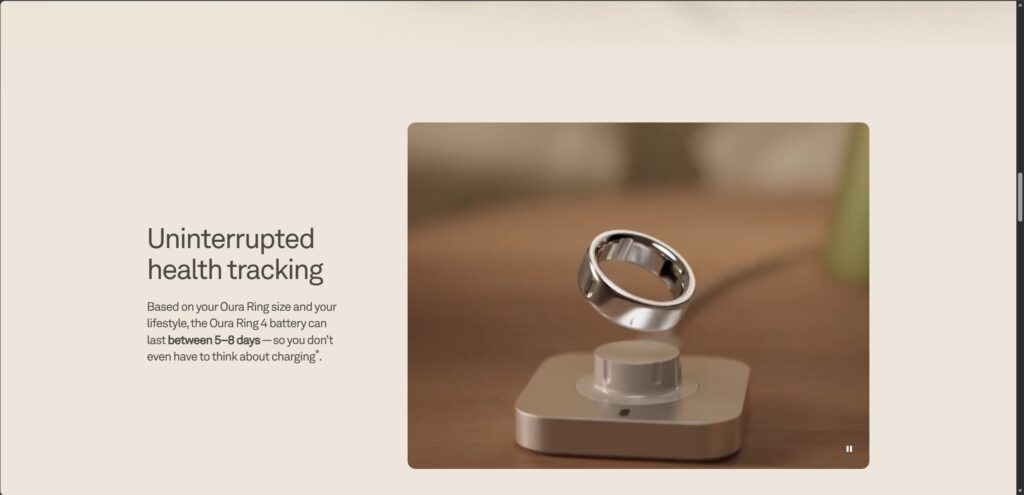
What makes it work is the division of labour between copy and image. The text carries the specific claim, the 5-8 days. The motion carries the feeling the claim is meant to produce: something settling into place, effortless, done. Nobody had to animate a battery percentage or a countdown. The product simply arrives home.
This is a cheaper shot than the Smart Sensing sequence by a wide margin. One object, one simple move, no simulation. If you are budgeting a page, this is the kind of sequence that gives you a motion moment without the render cost of the hero effect.
The finish selector: why Oura did not build a configurator
This is the decision most worth copying, and almost nobody notices it.
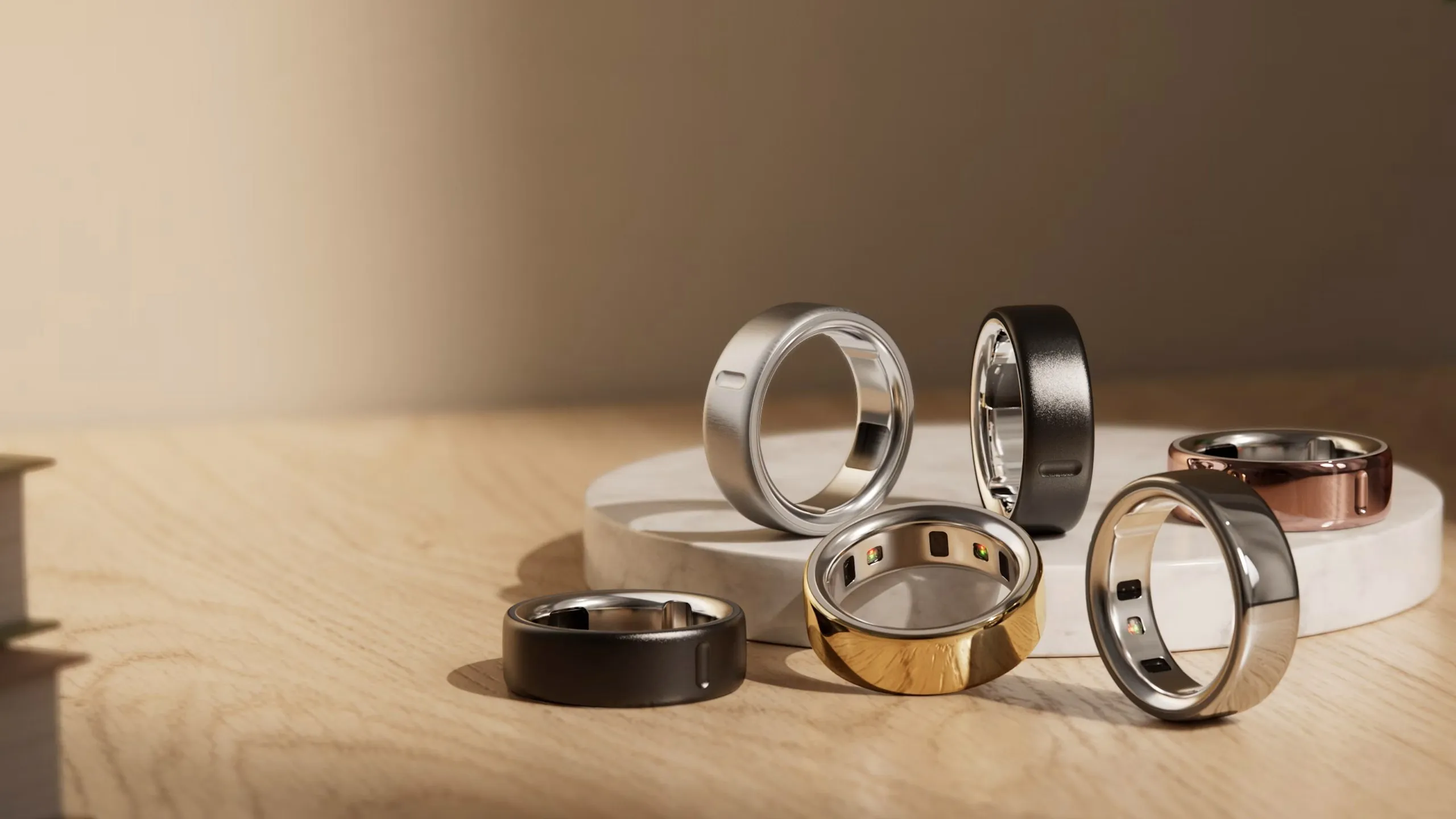
The “A finish for every lifestyle” section lets you click through six finishes: silver, black, brushed silver, stealth, gold, and rose gold. It looks like a product configurator. It is not.
Look at the asset names the page serves: finishes-carousel-slide-silver.png, finishes-carousel-slide-black.png, finishes-carousel-slide-gold.png, and so on. These are PNG stills. Six pre-rendered images behind a swatch selector. There is no 3D model in the browser, no shader compilation, no runtime lighting, nothing for the visitor’s GPU to do.

And they are not the same render with the material swapped. Each finish gets its own art direction. Gold rests on draped gold fabric, lit to catch the weave. Black floats above a dark curved surface against a warm neutral backdrop, at a different camera angle entirely. These are six separate lookdev setups treated as six product shots, not one scene rendered six times.
The trade-off is worth being explicit about:
| Pre-rendered stills | Real-time WebGL configurator | |
|---|---|---|
| Image quality | Full offline render, unlimited samples | Limited by the visitor’s GPU |
| Art direction per option | Bespoke environment and lighting for each | One scene, materials swapped |
| Load and runtime cost | A single image per selection | Model, textures, shaders, plus GPU work |
| Mid-range Android | Always fine | Frequently drops frames or overheats |
| Free rotation and zoom | No | Yes |
| Production cost | Scales with the number of options | Front-loaded, then options are cheap |
A configurator earns its cost when the visitor needs to control the product: many-dimensional combinations, custom sizing, spatial questions that a fixed camera cannot answer. Six colour options is not that problem. The buyer wants to see each finish looking as good as it can, and a bespoke render beats a real-time preview on that job every time.
A brand with this budget, this stack, and this design team looked at the configurator question and chose stills. That is a defensible reference point the next time someone tells you a product page needs interactive 3D.
Feel free to check out our pricing page for rough estimate of the cost to produce similar videos.
Production and delivery spec
Since the animated sections are video rather than frame sequences, the handoff is simpler than most brands expect.
- Length: 5 to 8 seconds per section. Long enough to complete one gesture, short enough that nobody scrolls away mid-move.
- Format: H.264 MP4 for universal support, with WebM VP9 or AV1 listed first for browsers that take it. Both, not one.
- Desktop encode: 1920 x 1080, targeting 2 to 4 MB. Two-pass encoding matters here, because a dense particle field compresses badly.
- Mobile encode: a separate portrait crop around 750 x 1334 at a lower bitrate. Do not let phones pull the desktop file.
- Poster frame: a real JPEG or WebP of the first frame, referenced in the
posterattribute. Non-negotiable, and covered below. - Attributes:
muted,playsinline, andpreload="none"or"metadata". Withoutplaysinline, iOS takes the video fullscreen and destroys the effect. - Loop point: if the section holds, render a clean resting composition on the final frame. If it loops, first and last frame must match exactly.
- Stills for selectors: full-resolution PNG or WebP per option, consistent framing where the options are meant to be compared, bespoke framing where each is meant to stand alone.
- Master delivery: always take a ProRes or uncompressed master alongside the web encodes, so you can re-encode later without going back to the render farm.
The mistake that makes your animation invisible to Google
A <video> element contains no indexable image. Neither does a <canvas>. Neither does an image loaded as a CSS background. If your product story lives entirely inside motion, you have built a page with excellent visuals, no image-search presence, no SERP thumbnail eligibility, and nothing for an AI assistant to extract when someone asks it about your product.
Oura’s -fallback.jpg files are not only there for slow connections. They are the crawlable representation of sections that would otherwise be holes in the page. The finish carousel, being real PNGs, is fully indexable by default, which is a quiet second benefit of choosing stills over a configurator.
Three requirements:
- A real
posterimage on every video, plus a genuine<img>with descriptivealttext where the layout allows, present in the served HTML rather than injected by JavaScript. - Respect
prefers-reduced-motion. Visitors with that setting should get the poster frame and a page that still makes sense. A camera push this aggressive triggers vestibular symptoms in a real portion of your audience. - Keep the surrounding copy in real text. Oura’s feature claims sit next to the video as crawlable HTML, not baked into rendered frames. Copy that.
Who does what
The 3D studio produces CAD cleanup and modelling, materials and lighting, particle and simulation work, camera choreography, the render, and both web encodes plus poster frames and selector stills.
The web team implements the <video> element and its sources, the scroll trigger or scrub binding, the swatch selector, the reduced-motion path, lazy loading, and the performance budget.
These are different disciplines. We do the first, and we deliver files specified so the second is a short task rather than a research project. Any studio claiming to do both end to end is usually weaker at one of them, and it is generally the rendering.
Should you do this at all?
Three conditions justify the cost:
- The product’s value is physically hidden. Oura is the textbook case: the sensors face inward, pressed against the finger, and the measured phenomenon cannot be filmed at all. The same applies to an internal pump, a layered filter, a folded hinge, a sealed airflow path.
- The page carries real traffic. This is a fixed production cost amortised over visitors. On a flagship product page it pays back easily. On a page doing 200 sessions a month it does not.
- You have a technical claim to prove. “Recessed sensors” is a bullet point. Watching the sensor array sit flush inside a seamless titanium interior is evidence. Motion demonstrates instead of asserting, which is why it converts.
And note the sequencing Oura used. One expensive hero sequence, one cheap supporting loop, and a set of stills doing the rest. If you are budgeting a page, that ratio is a better model than trying to animate everything.
Quince Creative has been producing CAD-to-cinematic 3D product animation for hardware and consumer product brands for over 14 years, including work for Philips, Mackie, GKN, and ADI. If you are planning a product page build and need the animation layer produced to spec, get in touch.
Related Articles
It Is 2026, Apple Puts AI in Every Device, and It Still Launched Its New Hardware With 3D Animation
3D Product Animation Trends in 2026: What Brands Are Doing Now
You Have a KeyShot File but No Animator. Here Is How to Get a Product Video Made
3D Product Demo Videos for Physical Products: Examples, Cost and Process
How DJI Uses 3D Product Animation to Launch a Product Almost Every Month
The Apple Formula: Why Every Tech Startup Wants Their 3D Animation to Look Like Apple (And How It’s Actually Done)
 Rachel A